8 things every detailing website needs to get leads
What turns a Google search into a booked job, how to build it free, and a 25-point scorecard for your site.
You getA website that turns Google searches into calls and bookings
Time1 to 2 hours, plus up to a day for your domain
You needA domain (about $20 a year) and the free Website Builder
Your website's job is simple: turn people who found you on Google into booked jobs. It also feeds your Google profile, because it tells Google what you do, where you do it, and that it can trust you. These are the 8 things that do it.
A headline that says what you do and where, with your star rating and review count right under it. "Mobile car detailing in [your city]" beats a slogan. Watch
A Book button and your phone number at the top of every page. The number written out and tap-to-call, and the Book button straight to the form. Call it "Book", not "Book by phone". Watch
Real prices, as exact as you can. People who see the price first rarely object to it, and Google uses pricing pages when people search detailing prices in your city. Watch
A page for every service. Ceramic coating and paint correction each get their own page. Watch
A page for every area you serve, each one about that area: drive time from your base, landmarks, roads and local car problems. Never the same page with the city name swapped.
Before and after photos, your own, ideally in a slider. Watch
Fast on a phone. Drop heavy moving backgrounds and sliders. Watch
Specific to you. If another detailer could swap their name in, rewrite it. Watch
Not techy? Claude writes the site and tells you every click. Mobile with no shop? You still get a page for every area you drive to. Already have a site? Score it with the scorecard at the end of this guide.
Build it free
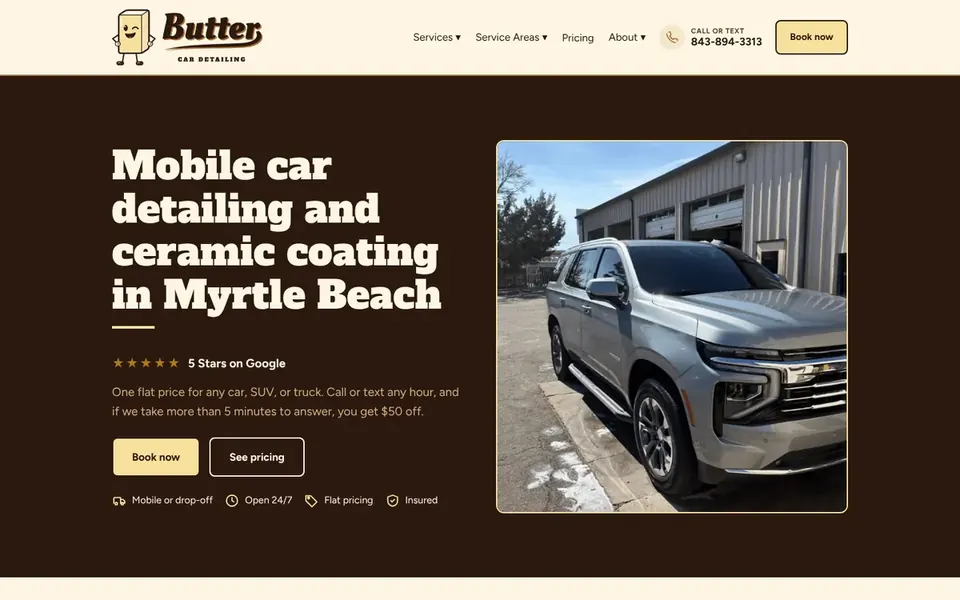
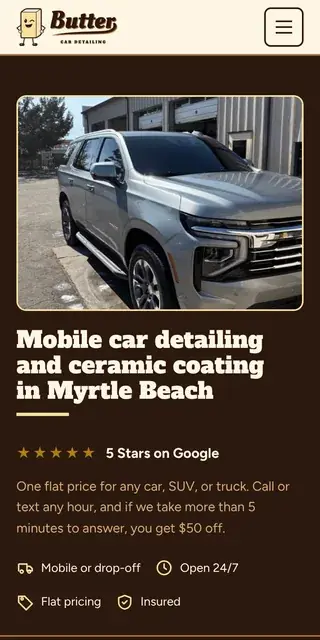
The free Website Builder is the Claude skill we use. It builds all of this and puts it live. Here's one it built:
Everything on the website checklist, including how your service tiers differ (say, a standard interior vs. one with shampoo): the price difference and the process difference.
What only you know: your name and how you started, what sets you apart (insured, flat pricing, certified coating installer, guarantees, veteran-owned, years in business), and what your area does to cars (salt air, sand, heat, pine sap). AI can't guess these, and they're what make the site yours.
A domain, about $20 a year, plus free GitHub and Cloudflare accounts.
Your photos in one zip. In Canva, click Create, choose Instagram Post, put one photo on each page (logo included), then Share, Download, PNG, All pages. Over 30 MB? Download again with Compress on. Include dirty and clean shots of the same cars so the site can show before and afters.
1. Start the build
In GitHub, click +, then New repository. Name it after your business, choose Private and click Create repository.
In Claude, switch from Chat to Code. Go to Settings, then Connectors, and connect GitHub.
Start a new chat, pick the repository you made, and check the branch says main. Choose the top Opus model and Max effort.
Attach the Website Builder zip and your photo zip, then copy this message, fill in the blanks and send it. Answer Claude's questions as they come. It tells you each click from here, one step at a time.
Build a website for my business. Business name (as on my LLC or DBA): ___. Phone: ___. Email: ___. Address customers can come to, or mobile only: ___. Main city: ___. Other towns I serve, with drive time from my base: ___. Services, with prices and what each tier adds: ___. Booking link: ___. Google Business Profile link: ___. Social links: ___. Owner name and how I started: ___. What sets us apart: ___. What our area does to cars: ___.
2. Get a preview link
In Cloudflare, open Workers & Pages, click Create, then Import a repository. Connect GitHub and allow this repository only.
Set the build command to npm run build and the deploy command to npx wrangler deploy, then click Deploy.
Open the Worker, then Settings, then Domains & Routes, check workers.dev is on, and open the link. That's your preview, hidden from Google until launch.
Tell Claude what to change in plain words, like "make the footer logo full color", or send a screenshot. Then go down the scorecard at the end of this guide and send Claude every red X.
3. Move your domain onto Cloudflare
In Cloudflare, click Add a domain and choose the Free plan.
Check the imported DNS records. Your email records (MX, and the TXT records for SPF, DKIM and DMARC) must be there, or your email stops working. If a website already runs on the domain, leave its records alone until launch.
At your registrar (GoDaddy: DNS, then Nameservers, then Change Nameservers, then I'll use my own), paste Cloudflare's 2 nameservers and save. It takes minutes to 24 hours.
4. Go live
Check every page. When you're happy, tell Claude you approve the design and you're ready to go live. Until then, Google can't index the site.
In Cloudflare, open the Worker, then Settings, Domains & Routes, Add, Custom domain, and add yourdomain.com. Do it again for www.yourdomain.com.
Go to Rules, then Redirect Rules, pick the template Redirect from WWW to root and deploy it. Then SSL/TLS, Edge Certificates, and turn on Always Use HTTPS.
In your booking tool, set every form to send people to https://yourdomain.com/thank-you/ after they submit. That's how you count bookings.
On your Google profile, set the website link to https://yourdomain.com/?utm_source=google&utm_medium=organic&utm_campaign=gbp so you can see which visitors came from Google Maps.
5. Tell Google
In Google Search Console, click Add property, choose Domain and type your domain. Choose Cloudflare, click Start verification and Authorize.
Open Sitemaps, enter https://yourdomain.com/sitemap.xml and click Submit. "Couldn't fetch" means the site isn't live yet: submit it again after launch. Then paste your 10 most important pages into the search bar at the top and click Request Indexing on each.
In Google Analytics, create a property for your business (objective: Generate leads), add a Web stream for your domain, and send Claude the Measurement ID (G-...). Then add the key events generate_lead, click_call and click_text, so every booking, call and text counts.